

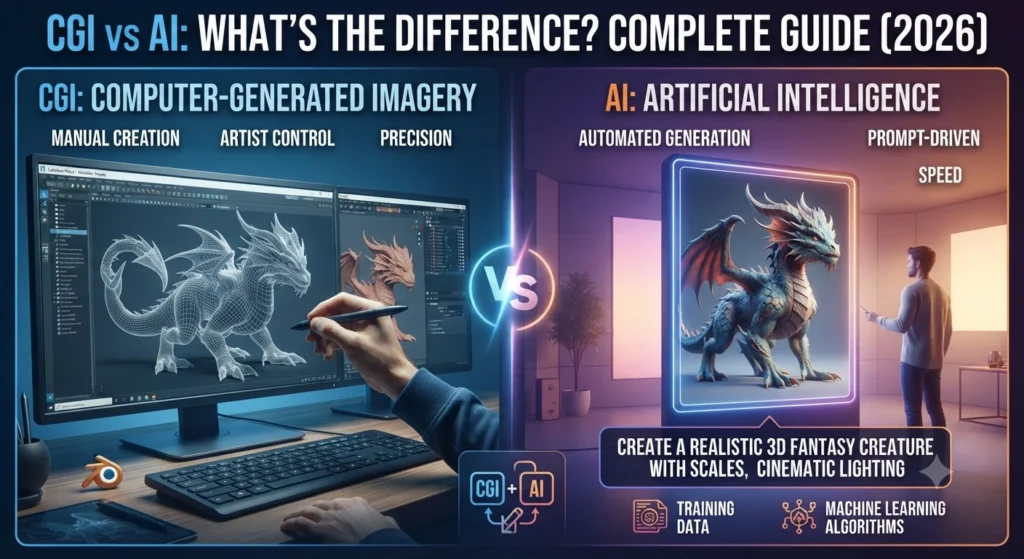
Artificial Intelligence (AI) has become one of the fastest-growing technologies in recent years, transforming industries from healthcare and education to software development and digital marketing. At the same time, Computer-Generated Imagery (CGI) has remained the backbone of modern movies, animation, video games, and visual effects for decades.
Source:
Because both technologies can create impressive digital content, many people assume they are the same thing. It is common to see AI-generated images mistaken for CGI or hear claims that AI will completely replace CGI artists.
The truth is more nuanced.
Although AI and CGI sometimes produce similar-looking results, they are built on entirely different technologies and serve different purposes. CGI relies on skilled artists who manually create 3D models, animations, lighting, and visual effects using specialized software. AI, on the other hand, uses machine learning algorithms to generate text, images, videos, or code based on patterns learned from large datasets.
Understanding these differences is becoming increasingly important for content creators, designers, filmmakers, marketers, and businesses deciding which technology best fits their projects.
How to Train ChatGPT for Accurate Content Generation Techniques (2026)
In this comprehensive guide, you will learn:
- What CGI really means
- What artificial Intelligence is
- The biggest differences between CGI and AI
- Where each technology excels
- Whether AI can replace CGI
- Real-world examples from movies, gaming, business, and content creation
- Which technology is better for different use cases
By the end of this guide, you will have a clear understanding of the difference between CGI and AI and how both technologies are shaping the future of digital creativity.
A Brief History of CGI and AI
Understanding the origins of CGI and AI helps explain why these technologies evolved for very different purposes.
The Evolution of CGI
CGI began gaining popularity in the 1970s and 1980s as computer graphics became powerful enough for film production. Early examples appeared in movies like Tron (1982), while later films such as Jurassic Park (1993) demonstrated how realistic digital creatures could transform visual storytelling.
Since then, CGI has become an essential part of:
- Hollywood filmmaking
- Television production
- Video game development
- Product visualization
- Architecture
- Engineering simulations
Advancements in real-time rendering and graphics hardware have continued to push CGI toward increasingly photorealistic results.
The Evolution of AI
Artificial Intelligence as a research field dates back to the 1950s. However, rapid improvements in computing power, cloud infrastructure, and machine learning have accelerated AI adoption over the past decade.
Today, AI powers technologies such as:
- Virtual assistants
- Recommendation systems
- Large language models
- AI image generators
- Autonomous vehicles
- Medical diagnostics
Modern generative AI became mainstream after the release of ChatGPT in late 2022, making AI-assisted content creation accessible to millions of users.
What Is CGI?
Computer-Generated Imagery (CGI) is the process of creating digital images, animations, and visual effects using computer software.
Source:
Autodesk Maya official documentation
Blender official documentation

Unlike traditional photography, CGI does not rely on a camera to capture real-world objects. Instead, artists build everything digitally—from characters and environments to lighting, textures, and camera angles.
CGI has been widely used in entertainment for decades and is responsible for many of the stunning visual effects seen in blockbuster films and AAA video games.
Professional artists typically create CGI using software such as:
- Blender – a free, open-source 3D creation suite used by independent artists and studios.
- Autodesk Maya – an industry-standard tool for film, animation, and game production.
- Cinema 4D – popular for motion graphics and broadcast design.
- Houdini – widely used for complex visual effects simulations such as explosions, smoke, and fluids.
- Unreal Engine – a real-time rendering and virtual production platform.
- 3ds Max – commonly used for architecture, product visualization, and game asset creation.
These applications allow artists to design realistic objects, animate characters, simulate explosions, create weather effects, and render highly detailed scenes.
How CGI Works
Creating CGI is a structured creative process that combines technical skills with artistic expertise.
1. Concept Design
Artists first develop sketches, storyboards, or concept art to visualize the final scene.
2. 3D Modelling
Objects and characters are built using polygons and digital geometry.
Everything—from a coffee cup to an entire city—must be modelled manually.
3. Texturing
Textures are applied to give surfaces realistic appearances.
Examples include:
- Skin
- Metal
- Glass
- Wood
- Fabric
- Stone
Without textures, 3D models would appear flat and unrealistic.
4. Lighting
Digital lighting mimics real-world light sources.
Artists carefully position lights to create mood, realism, and cinematic effects.
5. Animation
Characters, vehicles, and objects are animated using keyframes, motion capture, or physics simulations.
This stage brings the scene to life.
6. Rendering
Rendering converts the completed 3D scene into a final image or video.
High-quality rendering may take minutes—or even hours—per frame depending on scene complexity.
Common Uses of CGI
Today, CGI is used across numerous industries.
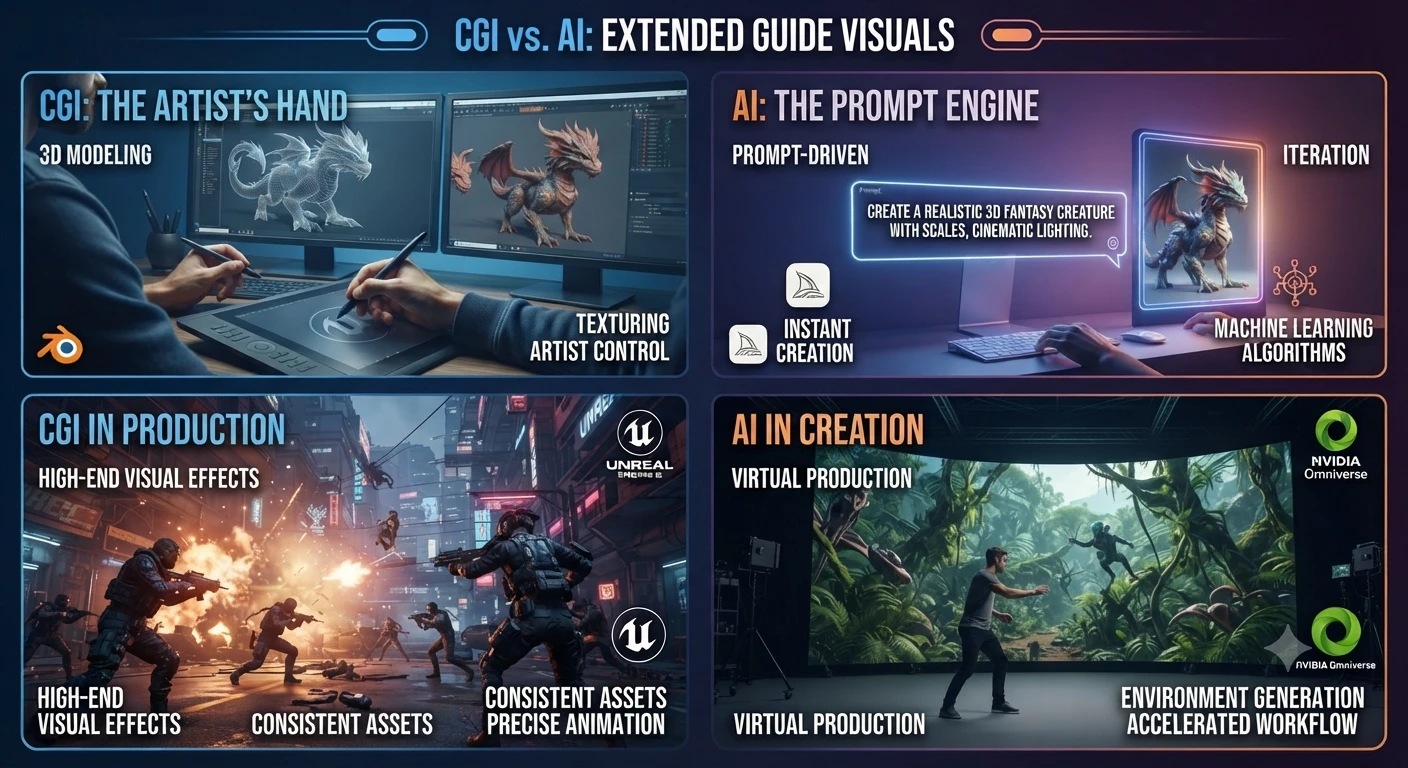
Film and Television
Movies rely on CGI for:
- Fantasy creatures
- Space scenes
- Explosions
- Superheroes
- Historical recreations
- Invisible visual effects
Popular examples include:
- Avatar
- Avengers: Endgame
- Jurassic World
- The Lion King (2019)
Many scenes that appear completely real are actually computer-generated.
Video Games
Modern games use CGI to create:
- Characters
- Open worlds
- Vehicles
- Buildings
- Weather systems
- Cinematic cutscenes
Game engines such as Unreal Engine and Unity combine CGI with real-time rendering to deliver immersive gameplay.
Architecture
Architects create photorealistic 3D visualizations before construction begins.
Clients can explore buildings long before they are built.
Advertising
Brands use CGI for:
- Product launches
- Commercials
- Automotive advertising
- Luxury product visualization
CGI makes it possible to create scenes that would be expensive—or impossible—to film in real life.
Advantages of CGI
CGI remains one of the most powerful creative technologies available because it offers exceptional control over every visual detail.
Highly Realistic Visuals
Experienced artists can create images that are nearly indistinguishable from real photography.
Complete Creative Control
Every object, texture, animation, and lighting setup can be customized.
Nothing is left to chance.
Unlimited Imagination
CGI allows creators to build impossible worlds, mythical creatures, futuristic cities, and cinematic environments that could never exist physically.
Long-Term Consistency
Once assets are created, they can be reused, modified, and rendered from different camera angles without starting from scratch.
What Is Artificial Intelligence (AI)?
Artificial Intelligence (AI) is a branch of computer science focused on building systems that can perform tasks that typically require human Intelligence.
Claude Code vs OpenCode: Which AI Coding Tool Wins in 2026?
Instead of manually designing every detail as CGI artists do, AI learns patterns from large amounts of data and uses those patterns to generate predictions or create new content.
Modern AI can:
- Answer questions
- Write articles
- Generate images
- Create videos
- Translate languages
- Analyze data
- Generate software code
- Summarize documents
- Assist with research
Unlike CGI software, AI does not require users to build every object or animation manually. Instead, users typically provide instructions—called prompts—and the AI generates content automatically.
How AI Works
While the technical details are complex, the basic workflow is easier to understand.
Step 1: Training
AI models learn patterns from enormous collections of text, images, audio, or video.
During training, the model identifies relationships between words, objects, colours, and concepts.
Step 2: Understanding Prompts
When a user enters a prompt, the AI interprets the request and predicts the most appropriate response based on its training.
Example:
Create a futuristic city at sunset with flying cars.
Instead of manually building the scene, the AI generates an image based on learned patterns.
Step 3: Content Generation
Depending on the model, AI can produce:
- Articles
- Images
- Videos
- Audio
- Computer code
- Marketing copy
- Product descriptions
- Research summaries
The entire process often takes only a few seconds.
Popular AI Tools
Artificial Intelligence now powers hundreds of creative and productivity tools.
| AI Tool | Primary Use |
| ChatGPT | Writing, coding, research, brainstorming |
| Claude | Long-form writing and advanced reasoning |
| Gemini | Search, productivity, and multimodal AI |
| Midjourney | AI image generation |
| Adobe Firefly | Commercial AI image creation |
| DALL·E | AI-generated artwork |
| GitHub Copilot | AI coding assistance |
Each tool uses AI differently, but all rely on machine learning rather than manual 3D design.
CGI and AI: Why People Often Confuse Them
The confusion usually starts because both technologies can produce visually impressive results.
For example:
- An AI image generated from a text prompt may look similar to a CGI illustration.
- A CGI character in a movie may appear so realistic that viewers assume it was created using AI.
- Modern filmmaking increasingly combines AI-powered tools with traditional CGI workflows, making the distinction even less obvious.
However, the process behind the final result is completely different. CGI is primarily artist-driven and manually constructed, while AI is data-driven and generates content based on learned patterns from training data.
Understanding this distinction is essential before deciding which technology is better suited for a specific project.
The Biggest Differences Between CGI and AI
Although CGI and AI are often mentioned together, they solve different problems and rely on completely different technologies. Understanding these differences will help you choose the right solution for your project.
CGI vs AI: Quick Comparison Table
| Feature | CGI | AI |
| Full Form | Computer-Generated Imagery | Artificial Intelligence |
| Primary Purpose | Create digital graphics and animations | Simulate human Intelligence and generate content |
| Human Involvement | Very High | Moderate (prompt-driven) |
| Content Creation | Manual by artists | Automatic based on prompts |
| Learning Ability | No | Yes |
| Training Required | Artist training | AI model training |
| Software Examples | Blender, Maya, Houdini, Cinema 4D | ChatGPT, Claude, Gemini, Midjourney |
| Output | 3D models, animations, VFX | Text, images, code, audio, video |
| Best For | Movies, games, architecture | Writing, automation, research, AI art |
| Production Time | Days to months | Seconds to minutes |
| Cost | Higher | Lower to moderate |
The comparison clearly shows that CGI focuses on manually creating digital visuals, while AI focuses on generating intelligent outputs based on patterns learned from data.
1. Human Creativity vs Machine Learning
The biggest difference between CGI and AI is how content is created.
CGI
A human artist intentionally creates every object.
Artists manually decide:
- Shape
- Colors
- Lighting
- Camera angles
- Materials
- Animation
- Visual effects
Nothing appears automatically.
AI
AI generates content after analyzing patterns learned during training.
A user enters a prompt such as:
“Create a futuristic city at sunset with flying cars.”
The AI then produces an image or other content within seconds.
This makes AI significantly faster, but users have less control over every detail compared with traditional CGI workflows.
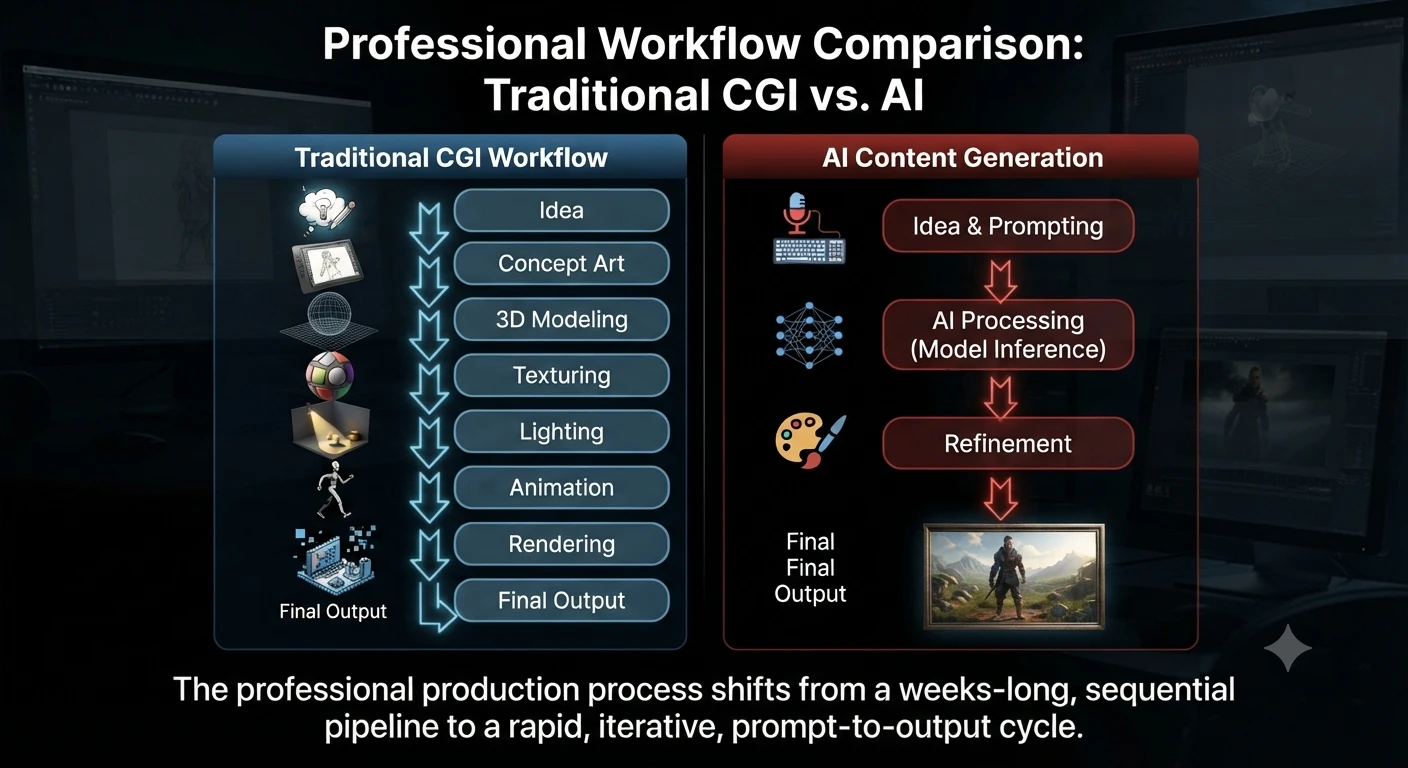
2. Workflow Differences
The production process differs dramatically.
Traditional CGI Workflow
Idea
↓
Concept Art
↓
3D Modeling
↓
Texturing
↓
Lighting
↓
Animation
↓
Rendering
↓
Final Output
A professional CGI project can take weeks or even months depending on its complexity.
AI Workflow
Idea
↓
Prompt
↓
AI Model
↓
Generated Content
↓
Human Editing
↓
Final Output
Many AI-generated images, articles, or videos can be produced in less than a minute.
3. Speed
One reason AI has become so popular is speed.
CGI
Creating a realistic movie scene may require:
- Character modeling
- Hair simulation
- Cloth simulation
- Lighting adjustments
- Physics simulations
- Rendering
Large Hollywood productions often spend months producing only a few minutes of finished visual effects.
AI
AI tools dramatically reduce production time.
Examples include:
- ChatGPT drafting articles within minutes
- AI image generators creating multiple concepts in seconds
- AI coding assistants writing boilerplate code instantly
- AI video generators producing short clips much faster than traditional animation
For rapid prototyping and brainstorming, AI has a clear advantage.
4. Level of Creative Control
Speed is important, but precision matters too.
CGI
Artists control:
- Every polygon
- Every texture
- Every light source
- Every animation frame
- Every camera movement
Nothing is left to chance.
AI
AI interprets prompts.
Even small wording changes can generate completely different results.
Although prompt engineering improves output quality, AI still cannot provide the same frame-by-frame precision as professional CGI software.
5. Learning Capability
Another major difference lies in learning.
CGI Software
Programs like Blender and Autodesk Maya do not learn from previous projects.
They provide creative tools that artists operate manually.
AI Systems
AI models learn patterns during training.
They can:
- Recognize language
- Generate images
- Translate text
- Write software code
- Answer questions
- Summarize documents
Learning is fundamental to AI but not to CGI.
6. Skill Requirements
Both technologies require valuable—but very different—skill sets.
CGI Artists Need
- 3D Modeling
- Animation
- Lighting
- Rendering
- Digital sculpting
- Color theory
- Composition
- Visual storytelling
Professional CGI often takes years to master.
AI Users Need
- Prompt engineering
- Critical thinking
- Fact-checking
- Editing
- Workflow optimization
- AI tool selection
Although AI lowers the barrier to entry, creating high-quality results still requires experience and human judgment.
Popular Software Used for CGI and AI
Although CGI and AI are often compared, professionals rely on completely different software depending on their goals.
Hammer AI Review 2026: Best Free AI Character Chat & Roleplay Platform
Popular CGI Software
| Software | Primary Purpose |
| Blender | Free 3D Modeling and animation |
| Autodesk Maya | Film and animation production |
| Houdini | Advanced VFX simulations |
| Cinema 4D | Motion graphics |
| Unreal Engine | Real-time rendering |
| Unity | Interactive 3D and game development |
Popular AI Tools
| Tool | Best For |
| ChatGPT | Writing, coding, research |
| Claude | Long-form reasoning |
| Gemini | Productivity and multimodal AI |
| Midjourney | AI artwork |
| Adobe Firefly | Commercial AI content creation |
| GitHub Copilot | AI coding assistance |
Official Tool Sources:
The right software depends entirely on your project’s requirements.
CGI vs AI in Real-World Industries
Understanding where each technology excels makes the comparison much clearer.
Movies and Television
CGI remains the industry standard for blockbuster films.
Examples include:
- Avatar
- Avengers: Endgame
- Dune
- Jurassic World
- The Lion King (2019)
CGI creates:
- Digital environments
- Creatures
- Explosions
- Weather simulations
- Space scenes
- Superheroes
How AI Is Used
AI increasingly assists filmmakers by helping with:
- Storyboarding
- Script analysis
- Voice enhancement
- Background cleanup
- Image generation
- Video editing
Rather than replacing CGI, AI enhances existing production workflows.
Video Games
Modern games rely heavily on CGI.
Artists create:
- Characters
- Weapons
- Buildings
- Landscapes
- Cinematics
Meanwhile, AI powers:
- Smarter NPC behavior
- Adaptive gameplay
- Procedural world generation
- Voice synthesis
- Automated testing
Together, CGI and AI create richer gaming experiences.
Marketing and Advertising
CGI
Brands use CGI to produce:
- Product renders
- Automotive commercials
- Luxury product showcases
- Impossible camera movements
AI
Marketing teams rely on AI for:
- Blog writing
- Email campaigns
- Social media posts
- Product descriptions
- Customer support
- Personalized recommendations
The goals are different, even though both technologies create digital content.
Architecture
Architects depend on CGI to visualize buildings before construction begins.
Clients can explore photorealistic interiors and exteriors months before the first brick is laid.
AI assists by:
- Generating design concepts
- Optimizing floor plans
- Predicting energy efficiency
- Automating documentation
Healthcare
CGI creates:
- Medical animations
- Surgical simulations
- Educational videos
AI supports:
- Disease detection
- Medical image analysis
- Drug discovery
- Clinical documentation
- Predictive analytics
Both technologies complement one another rather than compete.
CGI vs AI: Cost Comparison
Budget is often one of the biggest deciding factors.
| Factor | CGI | AI |
| Initial Cost | High | Low to Moderate |
| Software | Often requires paid licenses | Free and subscription options |
| Hardware | Powerful GPU required | Mostly cloud-based |
| Production Time | Days to months | Seconds to minutes |
| Team Size | Multiple specialists | Individual creators can often manage alone |
Reference Sources:
- Blender Documentation (CGI workflow)
- Autodesk Maya Documentation (3D production)
- IBM AI Overview (Artificial Intelligence)
For projects demanding maximum realism, CGI remains worth the investment.
For rapid content generation and smaller budgets, AI is often the more economical choice.
Can AI Replace CGI?
This question appears frequently as AI image generators become increasingly capable.
The short answer is:
No—not completely.
AI is transforming creative industries, but it is not a full replacement for professional CGI.
CGI Still Leads In
- Hollywood visual effects
- AAA video game production
- Engineering simulations
- Architectural visualization
- Product design
- High-end animation
These projects require frame-by-frame precision and consistency that AI cannot reliably provide.
AI Excels At
- Concept art
- Rapid brainstorming
- Marketing visuals
- Draft illustrations
- Social media graphics
- Content creation
- Image variations
AI should be viewed as a productivity tool that accelerates creative work rather than replacing experienced artists.
How AI and CGI Work Together
The future isn’t CGI vs AI.
It’s CGI + AI.
Many creative professionals now combine both technologies.
A common workflow looks like this:
- Use AI to generate concept art.
- Select the strongest design.
- Build detailed 3D assets using CGI software.
- Use AI to generate textures or enhance reference images.
- Complete animation, lighting, and rendering with traditional CGI tools.
This hybrid workflow significantly reduces production time while maintaining professional-quality results.
Advantages of CGI
Although AI has introduced new ways to create digital content, CGI remains the preferred choice for projects that require precision, realism, and complete artistic control.
1. Complete Creative Control
CGI artists decide every aspect of a scene, including:
- Camera angles
- Character movements
- Lighting
- Shadows
- Materials
- Facial expressions
- Visual effects
This level of control is essential for professional filmmaking, game development, and product visualization.
2. High-Quality Visual Effects
Modern CGI can produce visuals that are almost indistinguishable from real-life footage.
It is widely used for:
- Hollywood movies
- Television commercials
- Video game cinematics
- Architectural visualization
- Product marketing
3. Consistent Results
Once a CGI asset is created, it can be reused across multiple projects while maintaining consistent quality.
For example, a 3D car model can be rendered from different camera angles without rebuilding it from scratch.
4. Industry Standard
Major film studios, animation companies, engineering firms, and game developers rely on CGI because it delivers predictable, professional-quality results.
Limitations of CGI
Despite its strengths, CGI also has some drawbacks.
Time-Consuming
Creating realistic CGI scenes often requires weeks or even months of work.
Complex animations may involve multiple specialists working together throughout production.
Expensive
Professional CGI projects typically require:
- Skilled artists
- High-performance computers
- Licensed software
- Long production schedules
This makes CGI significantly more expensive than many AI-powered workflows.
Steep Learning Curve
Learning software such as Blender, Maya, or Houdini takes considerable time and practice.
Many professionals spend years mastering Modeling, lighting, animation, rendering, and visual effects.
Advantages of AI
Artificial Intelligence has transformed how individuals and businesses create digital content.
Its biggest advantage is speed.
1. Fast Content Generation
AI can produce:
- Articles
- Images
- Marketing copy
- Videos
- Code
- Presentations
within seconds or minutes.
2. Increased Productivity
Businesses use AI to automate repetitive tasks, allowing teams to focus on strategy and creative decision-making.
Common applications include:
- Customer support
- Email writing
- Research summaries
- Brainstorming
- Social media content
- Data analysis
3. Lower Costs
Compared with large CGI productions, many AI tools are affordable and accessible to freelancers, startups, and small businesses.
4. Beginner-Friendly
Unlike professional CGI software, many AI platforms require little technical knowledge.
A well-written prompt is often enough to generate useful results, making AI accessible to a wider audience.
Limitations of AI
AI is powerful, but it also has important limitations.
What Are the Best AI Tools for Business Workflow Analysis and Process Mapping in 2026?
Less Creative Control
AI generates content based on prompts.
Even small wording changes can produce very different results, making precision difficult for complex creative projects.
Inconsistent Output
The same prompt may generate different outputs each time.
Maintaining consistency across a long animation, branding campaign, or product line can therefore be challenging.
Possible Errors
AI may occasionally produce:
- Incorrect facts
- Unrealistic images
- Distorted objects
- Hallucinated information
Human review is essential before publishing or using AI-generated content professionally.
Copyright and Ethical Considerations
Organizations should understand licensing terms, intellectual property policies, and disclosure requirements when using AI-generated content, especially for commercial projects.
Reviewing the terms of the specific AI tool you use is an important step before publishing or distributing AI-generated assets.

Source:
U.S. Copyright Office – Copyright and Artificial Intelligence Reports
When Should You Use CGI Instead of AI?
Choosing between CGI and AI depends on your project’s requirements.
Use CGI When You Need
- Hollywood-quality visual effects
- AAA video game assets
- Architectural rendering
- Engineering simulations
- Product visualization
- Scientific visualization
- Highly controlled animation
Use AI When You Need
- Blog articles
- Marketing copy
- Social media content
- Brainstorming ideas
- AI-generated illustrations
- Research assistance
- Draft presentations
In many cases, combining both technologies delivers the best results.
Best Practices for Using CGI and AI Together
Organizations increasingly integrate AI into traditional CGI pipelines to improve efficiency.
Some best practices include:
- Use AI for brainstorming and concept art.
- Build final assets using professional CGI software.
- Fact-check AI-generated text before publishing.
- Review licensing terms before commercial use.
- Maintain human oversight throughout the production process.
- Combine AI’s speed with CGI’s precision for the highest-quality results.
This hybrid workflow helps creative teams work faster without sacrificing quality.
CGI vs AI: Which Should You Choose?
The right choice depends entirely on your goals.
| Your Goal | Recommended Technology |
| Create blockbuster movie effects | CGI |
| Develop AAA video games | CGI |
| Build architectural visualizations | CGI |
| Produce engineering simulations | CGI |
| Generate blog content | AI |
| Create marketing copy | AI |
| Brainstorm creative concepts | AI |
| Generate concept art quickly | AI |
| Automate repetitive writing tasks | AI |
| Produce high-end animations | CGI |
For many businesses, the most effective solution is combining AI and CGI rather than choosing one over the other.
Common Myths About CGI and AI
Let’s clear up some common misconceptions.
Myth 1: CGI and AI Are the Same
Reality: They are completely different technologies.
CGI is a graphics creation process, while AI is a broader field focused on enabling computers to perform tasks associated with human Intelligence.
Myth 2: AI Has Replaced CGI
Reality: No.
Professional filmmaking, AAA gaming, architecture, and engineering still depend heavily on CGI.
AI primarily speeds up parts of the creative workflow.
Myth 3: AI Requires No Human Input
Reality: High-quality AI output depends on:
- Well-written prompts
- Editing
- Fact-checking
- Creative direction
- Human review
Expertise still matters.
Myth 4: CGI Is Outdated
Reality: CGI continues to evolve through technologies such as:
- Real-time rendering
- Virtual production
- Physically Based Rendering (PBR)
- Ray tracing
- GPU acceleration
It remains one of the most important technologies in digital entertainment and design.
Future of CGI and AI
Rather than competing directly, CGI and AI are becoming complementary technologies.
Several trends are shaping the future:
- AI-assisted 3D modeling
- AI-powered texture generation
- AI-enhanced animation
- Real-time rendering improvements
- Intelligent visual effects automation
- Virtual production workflows
- Generative AI integrated into creative software
Creative professionals increasingly combine AI with traditional CGI software to improve productivity while maintaining artistic quality.
As AI continues to evolve, it is likely to become an intelligent assistant rather than a replacement for experienced CGI artists.
Frequently Asked Questions
Is CGI a type of AI?
No. CGI (Computer-Generated Imagery) is a graphics creation technique, while AI (Artificial Intelligence) is a broader field focused on building systems that can learn, reason, and generate content.
Can AI create CGI?
AI can assist with concept art, textures, and certain visual assets, but professional CGI projects still require specialized software and skilled artists to model, animate, and render high-quality scenes.
Does Hollywood use AI instead of CGI?
No.
Major film studios continue to rely heavily on CGI for visual effects.
AI is increasingly used for previsualization, editing, voice enhancement, and concept development, but it does not replace traditional CGI pipelines.
Which is better for beginners?
If your goal is content creation, image generation, or productivity, AI tools are generally easier to learn.
If you want a career in animation, visual effects, or game development, learning CGI software is a valuable long-term investment.
Is Midjourney CGI?
No.
Midjourney is an AI image-generation platform that creates images from text prompts.
Traditional CGI images are manually built using 3D graphics software.
Can ChatGPT create CGI?
No.
ChatGPT generates text and can help plan CGI projects, explain workflows, write scripts, or assist with creative ideas.
Professional CGI scenes are created using specialized 3D software such as Blender, Maya, or Houdini.
Turn your pitch into the exact cut
Conclusion
Understanding the difference between CGI and AI is becoming increasingly important as both technologies continue to shape digital creativity.
While they may produce visually impressive results, CGI and AI are fundamentally different in their purpose, workflow, and capabilities.
CGI focuses on manually creating high-quality 3D graphics, animations, and visual effects with complete artistic control. It remains the industry standard for blockbuster films, AAA video games, architectural visualization, engineering simulations, and product design.
AI, on the other hand, learns from vast amounts of data to generate text, images, code, audio, and other digital content quickly and efficiently. It has transformed industries by improving productivity, accelerating research, and automating repetitive tasks.
Rather than asking “CGI vs AI: Which is better?”, the more practical question is which technology best suits your project.
For high-end visual production, CGI remains unmatched. For rapid content creation and automation, AI offers significant advantages.
In many real-world workflows, the strongest results come from combining both technologies—using AI to accelerate brainstorming, repetitive tasks, and concept development while relying on CGI for precision, consistency, and professional-quality execution.
As both technologies continue to evolve, creators, developers, marketers, and businesses that understand when and how to use each will be better equipped to build innovative, efficient, and visually compelling digital experiences.
Our Tools
QR Code Generator
Text Alignment Tool
PDF to JPG
Turn images into one PDF
