


Artificial intelligence has transformed content creation, but one of the biggest misconceptions is that you need to train ChatGPT the same way developers train an AI model. For most users, that isn’t true.
Instead, producing accurate, trustworthy, and high-quality AI content depends on how you communicate with ChatGPT, not on changing the underlying model. The real skill is learning prompt engineering, context engineering, and structured research workflows that guide the model toward better results.
Whether you’re a blogger, marketer, student, researcher, or business owner, learning these techniques can help you create articles, reports, product comparisons, emails, and research documents that are more accurate and useful.
In this guide, you’ll learn how to train ChatGPT for accurate content generation using OpenAI’s recommended prompting practices, Deep Research, fact-checking methods, and proven AI content workflows.
What Does “Train ChatGPT” Actually Mean?
Many people search for phrases like “how to train ChatGPT” or “teach ChatGPT my writing style.” In reality, these searches often refer to improving responses rather than retraining the model itself.
CGI vs AI: What’s the Difference? Complete Guide (2026)
For everyday users, training ChatGPT means learning how to provide:
- Clear instructions
- Relevant background information
- A defined audience
- Specific goals
- Desired output format
- Quality expectations
Rather than changing the AI model, you’re improving the quality of the conversation so ChatGPT understands exactly what you need.
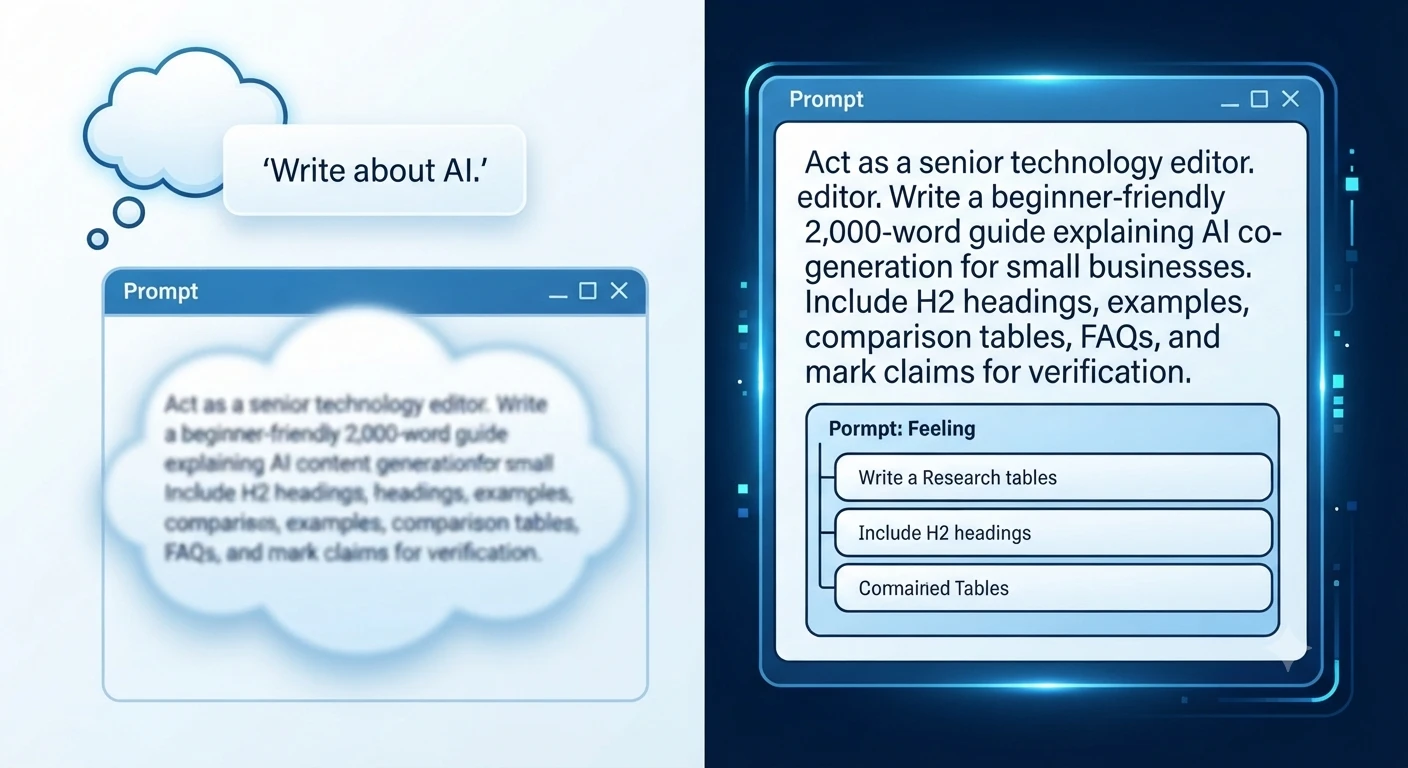
Think of ChatGPT as an experienced editor.
If you ask:
Write an article about AI.
You’ll probably receive a broad overview.
But if you ask:
Act as a senior technology editor. Write a beginner-friendly 2,000-word guide explaining AI content generation for small businesses. Include H2 headings, practical examples, comparison tables, FAQs, and clearly identify any claims that should be verified from official sources.
The second prompt gives ChatGPT a clear objective, audience, structure, and success criteria, making the response much more useful.
Can You Actually Train ChatGPT?
The short answer is no in the traditional machine learning sense.
Organizations can fine-tune certain AI models for specialized tasks, but most ChatGPT users improve results by providing better instructions rather than retraining the model.
You can influence ChatGPT by using:
- Prompt engineering
- Custom Instructions
- Project-specific context
- Uploaded reference documents
- Deep Research
- Follow-up refinement
These methods help ChatGPT generate responses that better match your goals without modifying the underlying model.
Why Accurate AI Content Matters More Than Ever
AI-generated content is now used across nearly every industry, from blogging and education to software development and business research. While AI can save time, publishing unverified information can damage credibility and reduce trust.
Accurate content is especially important when writing about:
- Technology
- Finance
- Healthcare
- Law
- Product reviews
- Market research
- SEO
- Software documentation
Even well-written AI responses can contain outdated information, incorrect product details, or unsupported claims. That’s why professional writers combine AI with human review and trusted sources.
How ChatGPT Generates Content
Understanding how ChatGPT works helps explain why some prompts produce excellent answers while others produce generic ones.
ChatGPT is a large language model (LLM). Instead of searching the internet every time you ask a question, it predicts the most appropriate response based on patterns learned during training and the information available in the current conversation.
Depending on how you’re using ChatGPT, it may also have access to tools such as web search or Deep Research, allowing it to retrieve current information and include citations.
Several factors influence every response:
- Your prompt
- The conversation history
- Any uploaded files
- Available tools (such as Search or Deep Research)
- The instructions you provide
This is why two users asking similar questions often receive different answers.
Why Some ChatGPT Responses Are More Accurate Than Others
Accuracy isn’t determined only by the AI model. In many cases, it’s the prompt that makes the difference.
Poor Prompt
Explain cybersecurity.
Who is the audience?
A high school student?
An IT manager?
A software developer?
A business owner?
The request doesn’t provide enough information.
Better Prompt
Explain cybersecurity to small business owners using plain English. Include common cyber threats, practical protection tips, real-world examples, and a checklist they can implement this week.
The second prompt provides context, audience, scope, and expected outcome, reducing ambiguity and producing a more targeted response.
Why ChatGPT Sometimes Produces Incorrect Information
Even advanced AI models can make mistakes. Understanding these limitations helps you build a more reliable workflow.
1. Missing Context
ChatGPT can only work with the information you provide.
If your request lacks important details, the model must make assumptions, which can lead to generic or inaccurate responses.
Instead of asking:
Write about cloud computing.
Try:
Explain cloud computing to non-technical entrepreneurs considering their first cloud migration. Include benefits, risks, pricing considerations, and common mistakes.
Adding context significantly improves relevance.
2. Ambiguous Instructions
Broad requests often produce broad answers.
For example:
Tell me about SEO.
This could refer to:
- Technical SEO
- Local SEO
- Ecommerce SEO
- Enterprise SEO
- WordPress SEO
- AI SEO
- International SEO
The more specific your request, the better the output.
3. Outdated Information
Technology changes rapidly.
Software features, pricing, regulations, APIs, and product capabilities evolve continuously.
Before publishing AI-generated content, verify:
- Pricing
- Release dates
- Product features
- Company announcements
- Industry statistics
- Government regulations
Whenever possible, confirm these details using official documentation.
4. AI Hallucinations
One of the most discussed AI limitations is hallucination.
Hallucinations occur when an AI confidently presents information that appears believable but is inaccurate or unsupported.
Examples include:
- Invented research papers
- Fake citations
- Incorrect statistics
- Wrong release dates
- Features that don’t exist
- Misattributed quotes
This is why experienced editors never publish AI-generated content without verification.
5. Lack of Source Validation
By default, ChatGPT generates language—it doesn’t automatically verify every statement against authoritative databases.
When factual accuracy matters, always ask ChatGPT to:
- Identify claims requiring verification.
- Separate facts from assumptions
- Include citations when available.
- Highlight uncertain information
These practices reduce the risk of publishing misleading content.
What Is Prompt Engineering?
Prompt engineering is the process of designing clear, structured instructions that help AI models generate more accurate and relevant responses.
Rather than simply asking a question, prompt engineering provides enough context for ChatGPT to understand:
- What to do
- Who the audience is
- What outcome you expect
- How the answer should be organized
- What tone to use
Think of prompt engineering as writing a detailed project brief for an experienced professional.
The clearer your instructions, the more likely you’ll receive a high-quality result.
Reference: Prompt engineering best practices for ChatGPT
OpenAI’s Prompt Engineering Best Practices
According to OpenAI’s guidance, effective prompts generally follow a few core principles.
Be Clear and Specific
Avoid vague requests.
Instead of:
Explain AI.
Write:
Explain generative AI to digital marketers using beginner-friendly language and include three practical business examples.
Provide Context
Context helps ChatGPT understand the situation.
Include information such as:
- Industry
- Audience
- Experience level
- Goals
- Constraints
- Existing knowledge
The more relevant context you provide, the more focused the response becomes.
Refine Prompts Iteratively
Prompt engineering is rarely a one-step process.
Instead of expecting a perfect answer immediately, review the first draft and improve it with follow-up requests such as:
- Expand this section.
- Simplify the explanation.
- Add comparison tables.
- Improve readability.
- Include practical examples.
- Highlight claims needing verification.
Each iteration usually produces a stronger final result.
Specify Tone and Style
You can also guide ChatGPT by describing the desired writing style.
Examples include:
- Professional
- Conversational
- Friendly
- Formal
- Educational
- Technical
- Journalistic
For example:
Explain prompt engineering in a professional yet conversational tone suitable for beginner bloggers.
This helps align the writing with your audience.
The Six Elements of an Effective Prompt
Most high-quality prompts answer six basic questions before asking ChatGPT to generate content.
| Prompt Element | Example |
|---|---|
| Role | Act as a senior technology editor |
| Audience | Beginner bloggers |
| Objective | Teach prompt engineering |
| Format | 2,000-word SEO article |
| Tone | Professional but conversational |
| Success Criteria | Accurate, practical, easy to understand |
Including these elements creates a strong foundation for reliable AI-generated content.
Why Better Prompts Produce Better Results
Prompt engineering isn’t about using secret words or tricks. It’s about reducing uncertainty.
The more precisely you define your request, the less ChatGPT has to guess.
That usually leads to:
- Better organization
- Higher factual accuracy
- Improved readability
- Stronger SEO structure
- More relevant examples
- Fewer revisions
Professional content creators often spend several minutes refining a prompt because better instructions save much more time during editing.
12 Prompt Engineering Techniques That Improve ChatGPT Accuracy
If you want to train ChatGPT for accurate content generation techniques, improving your prompts is the single most effective step you can take. Instead of expecting the model to guess your intent, provide detailed instructions that reduce ambiguity and guide the response.
The following techniques are based on widely recommended prompting practices and practical workflows used by content creators, researchers, and businesses.
1. Assign ChatGPT a Clear Role
One of the easiest ways to improve output quality is to tell ChatGPT who it should act as.
Instead of writing:
Write an article about SEO.
Try:
Act as a senior SEO editor with experience writing for technology websites.
Role-based prompting helps the model adjust:
- Writing style
- Technical depth
- Vocabulary
- Perspective
- Level of explanation
Example
| Generic Prompt | Role-Based Prompt |
|---|---|
| Write about AI. | Act as an AI consultant explaining artificial intelligence to small business owners. |
The second prompt usually produces more focused, audience-specific content.
2. Define Your Target Audience
The same topic should be explained differently depending on who will read it.
For example:
- Beginners
- Students
- Software developers
- Marketing teams
- Business owners
- Healthcare professionals
Weak Prompt
Explain machine learning.
Better Prompt
Explain machine learning to complete beginners using simple analogies, diagrams, and everyday examples.
Audience-focused prompts improve:
- Readability
- Relevance
- Engagement
- User satisfaction
3. Clearly State Your Goal
Many users describe only the topic.
Professional prompts describe the objective.
Instead of:
Write about cloud computing.
Specify your purpose.
Examples include:
- Explain
- Compare
- Teach
- Review
- Troubleshoot
- Summarize
- Recommend
- Analyze
Better Prompt
Explain how cloud computing reduces IT costs for small businesses and compare cloud storage with traditional servers.
The objective gives ChatGPT a clear direction.
4. Provide Background Context
Context dramatically improves AI-generated content.
Instead of immediately asking for an answer, explain the situation.
Poor Prompt
Write an About Us page.
Better Prompt
Our website publishes AI software reviews, technology tutorials, and productivity guides for beginners. Write an About Us page that emphasizes transparency, educational value, and editorial independence.
The additional information helps ChatGPT generate content that aligns with your brand.
5. Request a Specific Structure
High-quality articles follow a logical format.
Instead of saying:
Write a blog post.
Specify the structure you need.
For example:
- Introduction
- H2 headings
- H3 subheadings
- Comparison tables
- Step-by-step guides
- Practical examples
- FAQ section
- Conclusion
Example Prompt
Write a 2,000-word beginner-friendly guide using H2 and H3 headings, comparison tables, practical examples, and six FAQs.
Structured prompts usually produce structured content.
6. Specify Length and Depth
Word count influences the level of detail.
Examples:
- 500 words
- 1,000 words
- 2,000 words
- Executive summary
- Comprehensive guide
Instead of saying:
Write a guide.
Try:
Write an approximately 2,000-word beginner-friendly guide with detailed explanations and actionable examples.
7. Request Real Examples
Examples make AI-generated content significantly more useful.
Instead of asking for theory, request:
- Practical scenarios
- Templates
- Workflows
- Case studies
- Before-and-after comparisons
Example Prompt
Include three real-world scenarios showing how detailed prompts improve AI-generated articles.
Readers generally understand concepts faster when they’re demonstrated with examples.
8. Ask for Tables and Checklists
Tables make information easier to compare and scan.
Example:
| Prompt Quality | Accuracy | Structure |
|---|---|---|
| Generic | Low | Basic |
| Detailed | Medium | Better |
| Context-rich | High | Excellent |
You can also request:
- Decision matrices
- Checklists
- Comparison charts
- Summary tables
These improve readability and user experience.
9. Ask ChatGPT to Review Its Draft
Before accepting the final response, ask ChatGPT to perform a quality review.
Example prompt:
Review your response for grammar, repetition, unclear wording, factual uncertainty, missing sections, and readability improvements before presenting the final version.
Although this doesn’t replace human editing, it often improves the first draft.
10. Identify Claims That Need Verification
Instead of assuming every statement is correct, ask ChatGPT to identify information requiring fact-checking.
Example:
Highlight statistics, software features, pricing, dates, regulations, or research claims that should be verified using official sources.
This creates a more responsible publishing workflow.
11. Break Large Tasks Into Smaller Steps
Complex requests work better when divided into stages.
Instead of asking for everything at once:
Create:
- Outline
- Introduction
- Main sections
- Examples
- SEO optimization
- Fact-check review
- Final proofreading
Breaking work into smaller prompts generally produces more consistent results.
12. Improve the Prompt After Every Draft
Prompt engineering is iterative.
After reading the first response, continue refining it.
Examples:
- Simplify the language.
- Expand this section.
- Add comparison tables.
- Reduce repetition.
- Improve transitions.
- Add expert insights.
- Include beginner-friendly examples.
Every refinement helps the final content become more useful and polished.
How ChatGPT Deep Research Improves Content Accuracy
For complex projects, standard conversations may not provide enough depth.
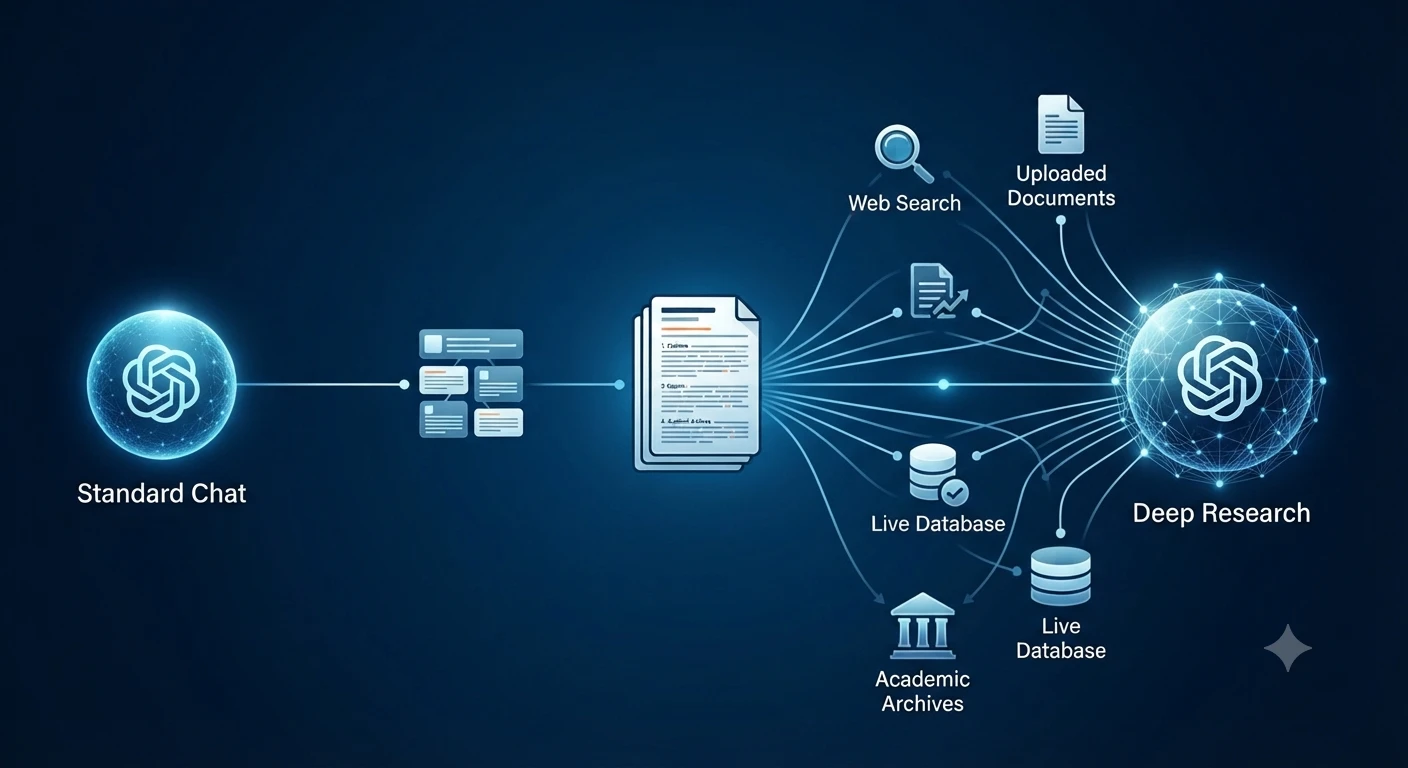
This is where Deep Research becomes valuable.
Deep Research is designed for multi-step investigations that require planning, gathering information, evaluating multiple sources, and producing a structured report.
Instead of generating a quick answer, Deep Research can:
- Create a research plan before starting.
- Break large questions into smaller research topics.
- Search the public web.
- Analyze uploaded files
- Use connected applications when available.
- Synthesize findings into a documented report.
- Include citations or source links for verification.
Unlike a typical chat response, Deep Research is built for research-heavy tasks where traceability and source verification matter.
How Deep Research Works
A typical Deep Research workflow follows these stages:
Step 1: Describe the Goal
Start by clearly explaining what you need.
For example:
Research the latest AI content generation techniques used by enterprise marketing teams. Compare major AI platforms, summarize current best practices, include citations, and identify areas where evidence is limited.
The clearer your objective, the better the research plan.
Step 2: Choose Your Sources
One advantage of Deep Research is that you can control where information comes from.
Depending on your setup, you can use:
- Public websites
- Uploaded PDFs
- Word documents
- Google Drive
- SharePoint
- Connected research applications
- Other enabled data sources
You can also prioritize specific websites or restrict Research to trusted domains.
Step 3: Review the Research Plan
Before Research begins, ChatGPT proposes a research plan.
Review it carefully.
Check whether it covers:
- Important subtopics
- Required comparisons
- Evaluation criteria
- Trusted sources
If necessary, modify the plan before continuing.
Step 4: Monitor Progress
Unlike a standard chat response, Deep Research shows its progress as it gathers information.
You can interrupt the task, refine the scope, or change the allowed sources if your priorities change.
Step 5: Review the Final Report
Completed reports typically include:
- Structured sections
- Table of contents
- Citations
- Source links
- Research history
- Download options
This makes the output easier to verify, share, and reuse.
Reference: How do I create a good prompt for an AI model?
Standard Chat vs. Deep Research
| Standard Chat | Deep Research |
|---|---|
| Fast responses | Multi-step investigations |
| General explanations | Structured research reports |
| Short conversations | Detailed documented reports |
| Limited synthesis | Multi-source analysis |
| Best for quick questions | Best for complex Research |
| Usually conversational | Includes citations and source links |
If you’re writing a long-form article, researching an industry, or preparing a business report, Deep Research usually provides a stronger starting point than relying on a single AI-generated response.
Context Engineering: The Next Step Beyond Prompt Engineering
Prompt engineering focuses on writing better instructions.
Context engineering goes further.
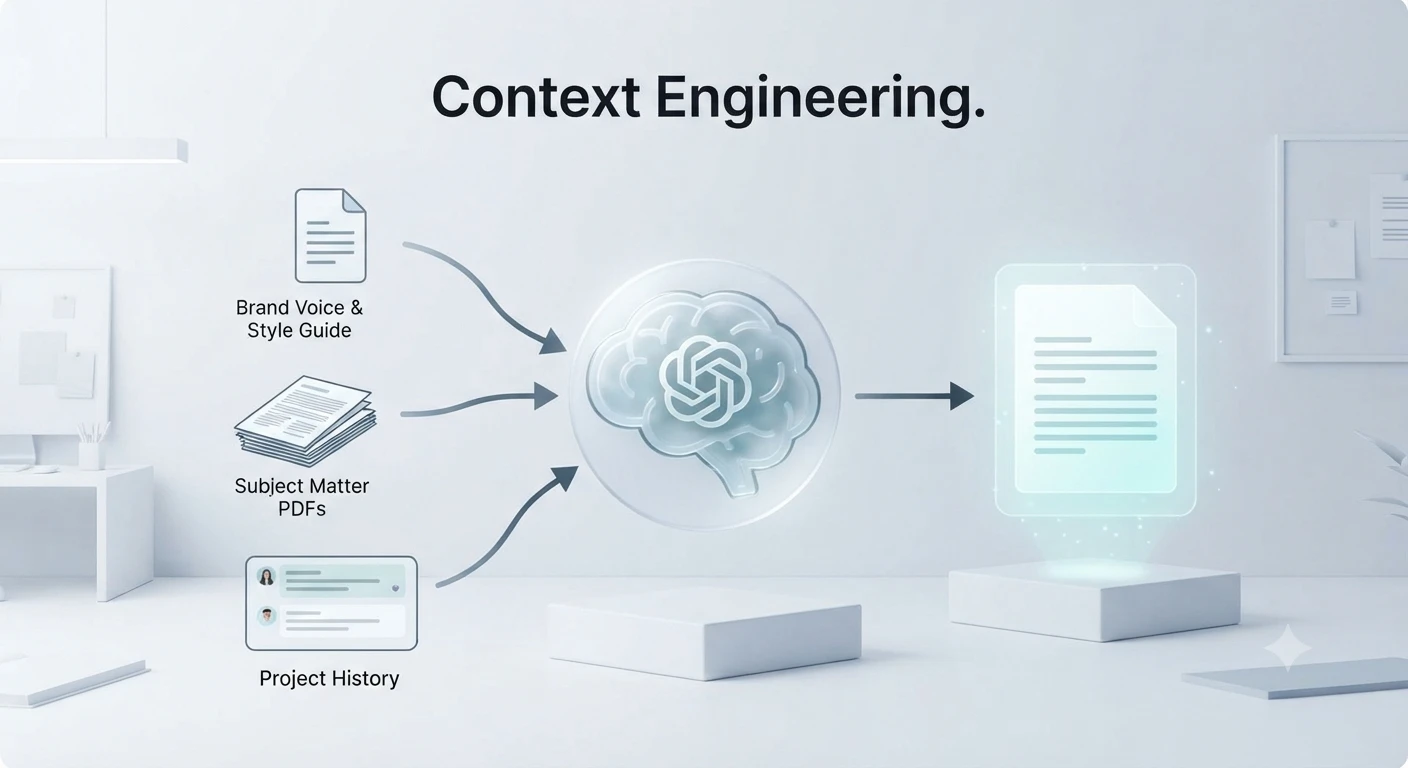
Instead of optimizing only the prompt, context engineering manages all the information available to the model while it works.
That may include:
- System instructions
- Uploaded documents
- Previous conversation history
- Examples
- External knowledge
- Tool outputs
- Search results
- Research notes
The goal is to provide the smallest set of high-value information needed to complete the task accurately.
Too much irrelevant context can reduce focus, while carefully selected context helps the model produce more reliable answers.
Why Context Matters
Imagine asking ChatGPT to review a 50-page technical report.
Instead of pasting the entire document, you might provide:
- Executive summary
- Key objectives
- Relevant chapters
- Important terminology
- Required output format
This focused context allows the model to spend more attention on the information that matters most.
For long projects, thoughtful context management often produces better results than simply increasing the amount of text you provide.
Prompt Engineering vs. Context Engineering
| Prompt Engineering | Context Engineering |
|---|---|
| Focuses on writing better prompts | Focuses on managing all available context |
| Improves instructions | Improves the entire working environment |
| Best for individual requests | Best for complex, long-running projects |
| Optimizes wording | Optimizes information quality |
Together, these approaches create a stronger foundation for accurate AI-assisted writing.
Build a Professional AI Content Workflow
Experienced writers rarely publish raw AI output.
Instead, they combine AI with Research, editing, and verification.
A practical workflow looks like this:
- Identify the search intent and target audience.
- Research authoritative sources.
- Create a detailed prompt.
- Generate the first draft.
- Expand weak sections.
- Add examples and comparison tables.
- Verify important facts.
- Optimize for SEO.
- Proofread the final version.
- Perform a final human review before publishing.
Following a structured workflow reduces errors and produces content that is more helpful, trustworthy, and aligned with modern search quality expectations.
Frequently Asked Questions (FAQs)
Is prompt engineering still important in 2026?
Yes, but its role has changed. Instead of focusing on clever tricks or hidden prompt formulas, modern prompt engineering emphasizes providing clear instructions, relevant context, reliable source material, and specific output requirements. For advanced Research, Deep Research features often deliver better results than relying on a single prompt.
What’s the difference between prompt engineering and context engineering?
Prompt engineering focuses on writing better instructions, while context engineering focuses on managing all information available to the AI, including:
- System instructions
- Uploaded documents
- Memory
- Conversation history
- External tools
- Connected applications
- Retrieved web sources
Context engineering generally produces more accurate outputs because the model works with higher-quality information rather than better wording alone.
How can I reduce ChatGPT hallucinations?
Try these proven techniques:
- Provide source documents
- Request citations
- Break complex tasks into smaller prompts.
- Use Deep Research for factual topics.
- Ask ChatGPT to verify claims.
- Specify uncertainty handling
- Cross-check important facts
- Ask for confidence levels.
- Compare multiple sources
- Avoid vague instructions
These methods significantly improve factual reliability.
Does Deep Research generate more accurate content than normal ChatGPT?
Generally, yes.
Deep Research is designed for multi-step investigations. It analyzes multiple sources, creates a structured research plan, synthesizes findings, and includes citations or source links for verification.
For quick brainstorming or simple questions, standard ChatGPT is usually faster.
Should I use one long prompt or several smaller prompts?
For complex projects, several focused prompts almost always work better.
A recommended workflow is:
- Create an outline.
- Research each section separately.
- Generate drafts section by section.
- Fact-check the draft.
- Improve readability.
- Perform a final SEO review.
This iterative process typically produces more accurate and higher-quality content than one massive prompt.
Can ChatGPT write content that’s ready to publish?
It can produce an excellent first draft, but a human should still review every article.
Before publishing:
- Verify factual claims
- Check statistics
- Review citations
- Update outdated information
- Add personal expertise
- Optimize SEO
- Edit for brand voice.
- Proofread grammar
Human review remains essential for quality and credibility.
Which industries benefit most from accurate AI content generation?
Accurate AI-assisted writing is especially valuable in:
- Digital marketing
- Blogging
- Journalism
- Technical documentation
- Software development
- Education
- Healthcare content (with expert review)
- Finance (with compliance review)
- Legal research support (not legal advice)
- Academic Research
- E-commerce
- SaaS documentation
Final Thoughts: The Future of Training ChatGPT for Accurate Content Generation
Learning to train ChatGPT for accurate content generation techniques is no longer about discovering secret prompts. The most reliable results come from combining clear instructions with high-quality context, structured workflows, verification, and evidence-backed Research.
Modern AI content creation is evolving from simple prompting to comprehensive context management. Features like Deep Research, connected knowledge sources, iterative refinement, and citation-based reporting make it possible to create content that is not only faster to produce but also significantly more trustworthy.
To consistently generate accurate content:
- Write clear, specific prompts.
- Provide sufficient context and supporting material.
- Break complex tasks into smaller steps.
- Use Deep Research when depth and citations matter.
- Request structured outputs and source references.
- Refine responses iteratively instead of expecting perfection in one prompt.
- Verify important claims before publication.
- Add human expertise, experience, and editorial judgment.
AI is most effective as a collaborative assistant rather than a replacement for critical thinking. By following these best practices, you can produce content that aligns with modern SEO expectations, supports E-E-A-T principles, and delivers greater value to readers.
Whether you’re a blogger, marketer, researcher, student, or business owner, mastering these techniques will help you create more accurate, reliable, and useful content with ChatGPT.
Key Takeaways
- Training ChatGPT starts with clear, detailed prompts and enough context.
- Context engineering is becoming more important than prompt engineering alone.
- Deep Research is ideal for complex, evidence-based reports with citations.
- Breaking large tasks into smaller prompts improves accuracy and consistency.
- Few-shot examples help guide the desired output format and style.
- Grounding the model with trusted sources reduces hallucinations.
- Asking for citations and structured outputs increases reliability.
- Human review remains essential before publishing AI-generated content.
- Iterative refinement consistently outperforms one-shot prompting.
- Combining AI with human expertise produces the highest-quality content.
Our Tools
QR Code Generator
Text Alignment Tool
PDF to JPG
Claude Code vs OpenCode: Which AI Coding Tool Wins in 2026?
Does Google Drive Work with AI Tools? Complete Guide (2026)
What Are the Best AI Tools for Business Workflow Analysis and Process Mapping in 2026?
Hammer AI Review 2026: Best Free AI Character Chat & Roleplay Platform?
